
.png)
.png)


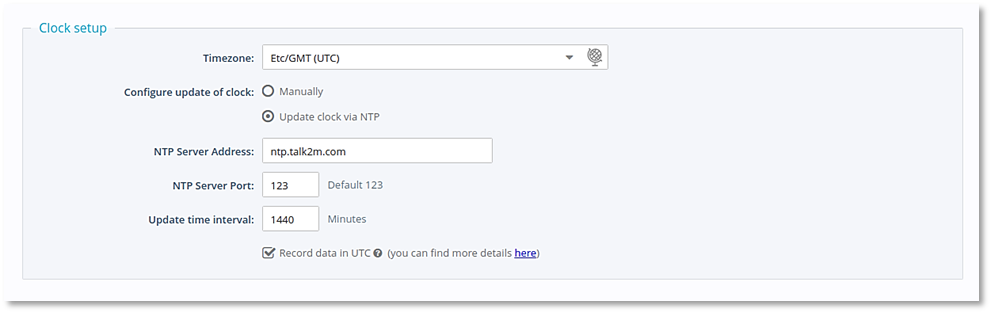
Clock Setup
Background: UTC=GMT if you are looking at time zones. Although UTC is technically not linked to any time zone, the way the EWON displays its UTC is GMT (zero offset).
These are the clock settings the Ewon device needs to use. UTC/GMT (no offset).
Troubleshooting Table
The following Troubleshooting Table is provided to help troubleshoot Ewon setup/connection issues. This is a living table and additional content will be periodically added as issues and recommendations arise.
|
|

Click from the list of Problems to go directly to it in the table below:
Mqtt "CONNECT" errors
Mqtt "TRANSMIT FAIL" error
| PROBLEM | POSSIBLE CAUSE |
|---|---|
|
|
Should the Arca Ewon go offline, not only is the network connection interrupted, but also the ability for the Ewon to capture data on its ports. The result is the Ewon will not buffer data and resend when it restarts. That data, using the existing Ewon configuration, is lost and/or reported as zeros. |
|
RECOMMENDED ACTION |
|
|
1. Check cable and power recommendations on the Ewon Support pages. 2. Ensure you are using the latest firmware on the device, at least 14.3. |
|
| ADDITIONAL INFORMATION | |
| If the Ewon remains online and the network connection is interrupted, data will still be sent to Pani when the network is restored as long as the memory buffer does not overrun. There should be no data lost in this instance as long as the interruption is less than an hour. This can be extended to several hours using an external SD card, if your unit supports it. | |
| PROBLEM | POSSIBLE CAUSE |
| Mqtt "CONNECT" errors | Usually caused by the device not being able to access the public internet. |
| RECOMMENDED ACTION | |
|
1. Use the Ewon Internet connection wizard to verify connection. 2. If the MQTT error persists, make sure that port 8883 is not restricted on the Ewon or any router that the Ewon uses to communicate with the outside world. 3. Use the ebuddy app to connect to the Ewon device's onboard http configuration app via a browser. |
|
| ADDITIONAL INFORMATION | |
|
The Ewon communicates with the ebuddy app via a direct connection to the device. NOTE: Being connected to the Ewon configuration page does not mean the device has access to the external internet. Access to the external internet is required to interface with the Pani platform. Use the setup wizards from the configuration app to ensure you have external internet access via a router, wifi or cellular connection |
|
| PROBLEM | POSSIBLE CAUSE |
| Mqtt "TRANSMIT FAIL" error |
1. Keys are missing, not working, or not named correctly. 2. Ewon device cannot get out to public internet. |
| RECOMMENDED ACTION | |
|
1. Verify content in the public key file. 2. Ensure a firewall is not blocking access. |
|
| ADDITIONAL INFORMATION | |
| The PUB file is the public key to access our interface and the Script file is the instructions that the EWON will execute to send the plant tag data to Pani. | |

