
.png)
.png)


The Pani Digital platform has several report types. Several real-time reports are available on the Overview page. On Base, there are also push reports that are sent via email and SMS.
Alerts (L1)
On the Base platform, Alerts will be sent to the user and designated members whenever a specified alert is activated in the operation. They can be sent through email or text to keep designated members constantly informed of important operation activities. They provide a deep Insight on the event including historical and after event graphical information, what happened and the Alert’s Operator Note with recommendations for next steps.
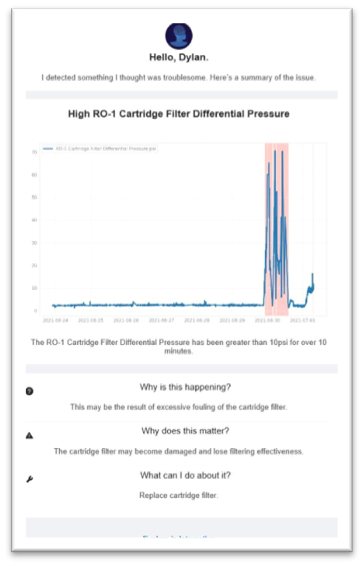
You can easily get additional detail on the alert by clicking on the “Explore in Interactive” link at the bottom of the L1 report. This will launch the Pani Digital platform and take you to the Insights page.
The frequency of these reports is preset by Pani. Should this frequency need adjustment, please submit a support ticket as described in the Getting Support section.
Performance Reports (L2)
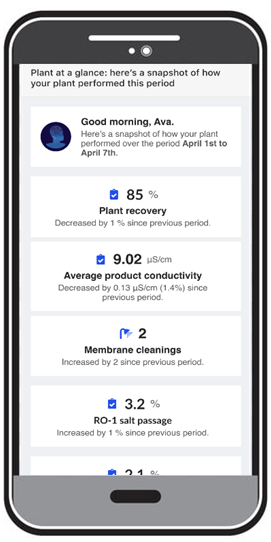
The Performance Report is a weekly report sent to the user and designated members. It displays main KPIs that can be customized to meet business needs. The report can be sent through email or text and sent on selected days as per business requirements.
Intel Reports (L3) - Intelligence Briefing (Genius Only)
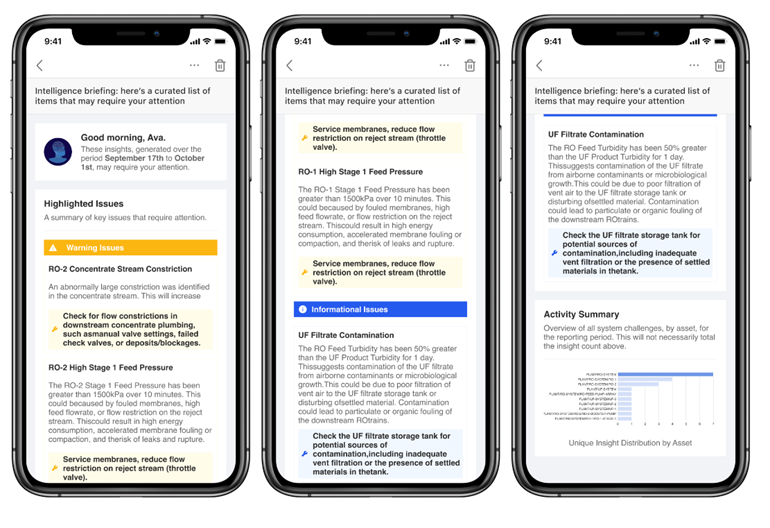
The Intel report is a weekly report sent to the user and designated members. The report summarizes critical events that occurred in the past week and includes information on predicted events for the upcoming week including membrane servicing. The report summarizes the activities per asset to help identify healthy and poor acting assets. The report can be sent through email or text and sent on selected days as per business requirements.
Configuring E-mail and Text Alerts
Please contact Pani Energy using the support portal to request changes to report content or report distribution.

